Use Sandboxie UAC
Overview
UseSandboxieUAC is a global setting in Sandboxie Ini that controls Sandboxie's enhanced prompt within the Sandboxie UAC proxy path. It is enabled by default.
Sandboxie can recognize supported asynchronous elevation requests to the Windows Application Information (AppInfo) service and route them through its UAC proxy. This setting is consulted after a request has entered that proxy path:
UseSandboxieUAC=yshows Sandboxie's enhanced prompt.UseSandboxieUAC=nskips the enhanced prompt, but the underlying Sandboxie UAC proxy handling continues.
Disabling this setting therefore does not disable the UAC proxy. See No UAC Proxy for the separate setting that disables Sandboxie's interception of supported UAC RPC requests.
Prompt choices
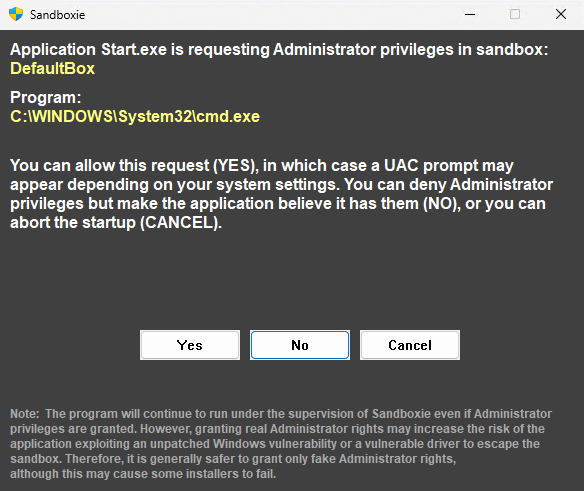
The enhanced prompt identifies the sandbox and requesting program and offers these choices:
| Choice | Result |
|---|---|
| Yes | Requests real elevation. Sandboxie may use an available administrator or linked administrator token in the applicable quick path; otherwise it continues through the normal Windows runas elevation flow. |
| No | Uses fake administrator rights for this elevation operation. The application may observe selected administrator checks as successful, but it does not receive a genuinely elevated administrator token. |
| Cancel | Completes the intercepted elevation request as cancelled; the requested elevated launch is not approved. |
The fake-administrator choice is related to Fake Admin Rights, but it does not enable FakeAdminRights=y globally or for every process in the sandbox.
Secure desktop
The Prompt On Secure Desktop setting controls whether Sandboxie's enhanced prompt is permitted to use the secure desktop. The prompt is placed there only when that setting is enabled and the host Windows UAC policy also uses secure-desktop prompting.
You can customize the secure-desktop background used by Sandboxie's prompt by placing SbieWallpaper.png in the Sandboxie Plus installation directory.
Relationship to other elevation settings
The three elevation-related settings act at different stages:
- Apply ElevateCreateProcess Fix can retry a
CreateProcesslaunch through Windowsrunasafter the original call fails because elevation is required. - No UAC Proxy controls whether Sandboxie intercepts supported AppInfo/UAC asynchronous RPC requests and routes them through its proxy.
- UseSandboxieUAC controls whether the already-active proxy shows Sandboxie's enhanced preliminary prompt.
In particular, UseSandboxieUAC=n is not equivalent to NoUACProxy=y.
SandMan configuration
In Sandboxie Plus, open Options > Global Settings > Advanced Config > Sandboxie Config and use:
Use Sandboxie's own enhanced UAC prompt (recommended)
The checkbox is selected by default. The current interface describes the option as recommended; the older experimental label is no longer current.
Applying changes
The service reads this global setting when handling each applicable elevation request. After the configuration change has been saved and reloaded, subsequent requests use the new value; restarting sandboxed processes, SbieSvc, or the driver is not normally required. A request already in progress is not changed retroactively.
Version history
UseSandboxieUAC and Sandboxie's enhanced prompt were introduced in Sandboxie Plus 1.16.0 / Classic 5.71.0.