Immediate Recovery
This page retains the Sandboxie Control / Classic screenshot and workflow. Current Sandboxie Plus uses SandMan for recovery dialogs or notifications; see File Recovery Architecture.
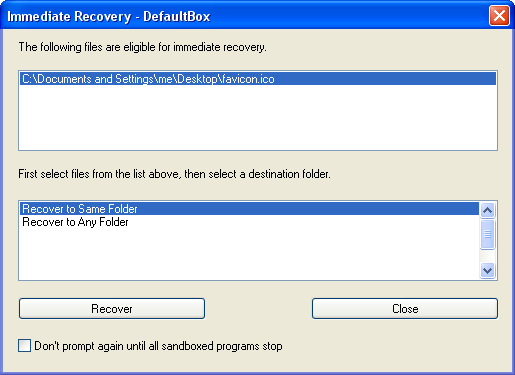
Immediate Recovery uses the configured RecoverFolder entries, but it is not the same scan as Quick Recovery. With AutoRecover=y, SbieDll detects eligible file activity in the sandboxed process and applies AutoRecoverIgnore. Quick Recovery separately scans and lists files when invoked.
Quick Recovery is invoked by explicit request, or through the Classic deletion workflow, typically after sandboxed programs have finished running. By contrast, Immediate Recovery's detection runs in the sandboxed process. Presentation and the actual move out of the sandbox are handled by the host-side recovery UI. An eligible, non-empty file is reported after relevant file activity, not necessarily at the exact moment it is created.
In the Classic workflow shown above, eligible files appear in the Immediate Recovery window, and further candidates can be collected while it remains open. The upper area shows eligible files, while the lower area lists destination folders. Current SandMan may instead present a notification, depending on its global notification preference; a temporarily suppressed prompt may not appear.
To recover files, select one or more files in the upper area, then select a folder from the lower area, and click Recover. (Use the CTRL and SHIFT keys to select multiple files in the upper area).
The lower area initially offers just the special destinations Recover to Same Folder and Recover to Any Folder. These work the same as described in Quick Recovery. As you use the Recover to Any Folder command, more destinations will be recorded in the lower area for later use.
- You can disable this feature by clearing the checkbox Store selected folders for later use in the Browse For Folder dialog box that appears when you invoke the Recover to Any Folder command.
In the Classic window, Immediate Recovery prompting can be temporarily disabled until all sandboxed activity stops by marking Don't prompt again until all sandboxed programs stop. SandMan has its own presentation preferences under Global Settings > General Config > Notifications and Recovery Options.
Go to Quick Recovery, Sandboxie Control, Help Topics.