Security Hardened Mode
NOTE: This feature requires a supporter certificate.
The security hardened box and the concept of security hardened mode was introduced in Sandboxie Plus v1.3.0. It limits original/full-token execution within Sandboxie's system-call mediation to approved NT and Win32k system calls. It also provides device security by restricting device access to known safe/filtered endpoints.
The setting for a security hardened box can be enabled by adding UseSecurityMode=y to the box settings section of Sandboxie Ini. It can also be enabled in the Sandman UI. Right-click on a box and select "Sandbox Options" from the drop-down menu (or simply double-click on a box) to bring up the Box Options UI. Select the box type preset as "Security Hardened Sandbox" (with an orange box icon) and click OK to apply changes. The status column of Sandman UI labels this box as Enhanced Isolation.
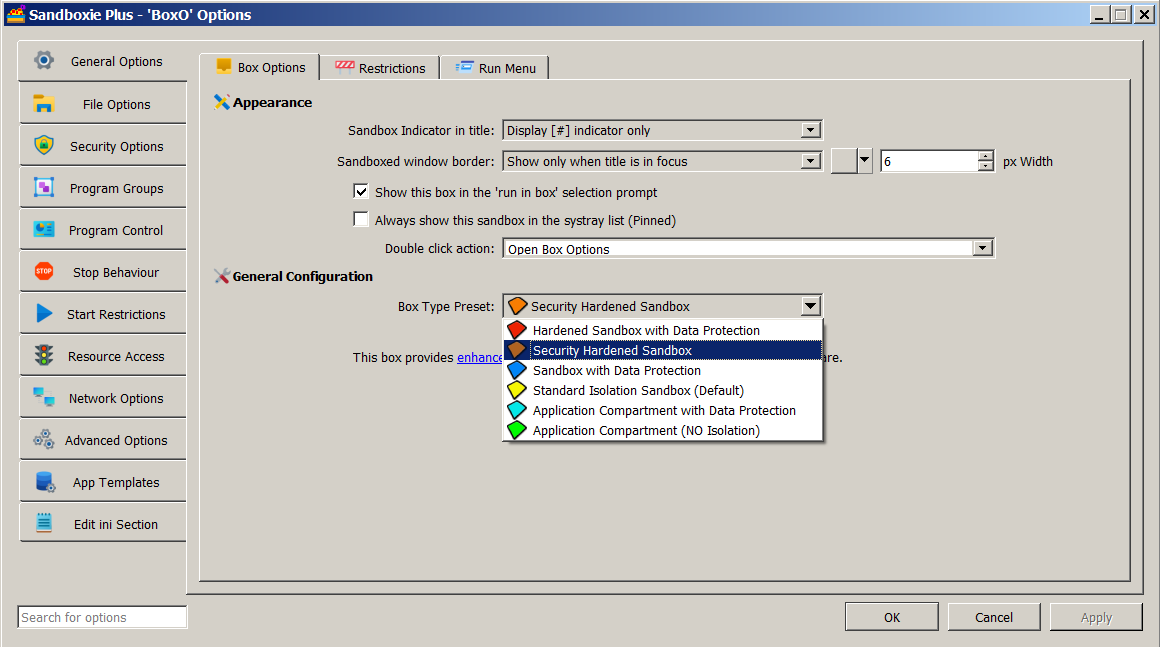
At runtime, UseSecurityMode=y activates four related security behaviors. These relationships do not mean that enabling the preset writes four separate settings into the sandbox configuration:
-
DropAdminRights:
UseSecurityMode=yapplies the drop-admin-rights behavior during token processing. Prior to Sandboxie Plus v1.3.0, any box withDropAdminRights=ywas considered hardened and labeled "Enhanced Isolation" in the Sandman UI status column. Starting with Sandboxie Plus v1.3.0, only boxes withUseSecurityMode=yhave their status listed as "Enhanced Isolation". -
System-call lockdown:
UseSecurityMode=ycauses the process to use theSysCallLockDownbehavior. Under lockdown, an intercepted NT or Win32k system call receives Sandboxie's original/full-token execution path only when its entry is approved. Unapproved intercepted calls continue under the restricted sandbox token and may fail when required rights are absent.ApproveWinNtSysCallsupplies NT approvals, whileApproveWin32SysCallsupplies Win32k approvals when that hooking path is active. Approval affects this token-selection decision; it does not necessarily bypass the Sandboxie handler for the call. After changing approval entries, reload the configuration using Options > Reload configuration so the current driver maps are updated. -
RestrictDevices:
UseSecurityMode=yapplies the device-restriction behavior. An earlier "DeviceSecurity" template was replaced by a dedicated settingRestrictDevices=yin Sandboxie Plus v1.3.0 to harden box security even further. This behavior broadly closes access to arbitrary endpoints under the NT\Devicenamespace while retaining built-in compatibility exceptions. Additional narrowly scoped Normal path rules can allow specific device endpoints when required. -
Rule Specificity: The device-restriction behavior activated by
UseSecurityMode=yalso enables rule-specific path matching. The settingUseRuleSpecificity=ycan enable this behavior directly, allowing rules to be prioritized based on their "specificity". When rule specificity is combined withNormal[File/Key/Ipc]Pathentries, selected subpaths can be made readable/writeable while parent paths are still protected. A security hardened box works in a default allow mode: every path is aNormal[File/Key/Ipc]Path(which allows read/write changes to a sandbox) unless specifically blocked by an overriding rule.
Comparison with Other Box Types: RuleSpecificity along with Normal[File/Key/Ipc]Path entries is also used in blue (privacy enhanced) boxes and in red boxes (that combine enhanced privacy and enhanced security). These two box types work in a default block mode: all drive paths are set to WriteFilePath. This hides all files and folders outside the sandbox, but allows new files and folders to be created in the sandbox (unless specifically allowed by an overriding rule).
Recent Changes: Starting with Sandboxie Plus v1.8.0, all built-in access rules for a security hardened box have been moved to a dedicated template (included in the file Templates.ini under the [TemplateSModPaths] section) for easier management.