Application Compartment
Note
This feature requires a supporter certificate.
Application Compartment was introduced in Sandboxie Plus 1.0.0. It favors application compatibility by bypassing several security-isolation mechanisms used by a standard sandbox while retaining selected Sandboxie virtualization and policy mechanisms.
Warning
Application Compartment materially reduces isolation and should be used only for trusted applications with compatibility requirements. It is not equivalent to running without Sandboxie, but file and registry virtualization alone should not be treated as a security boundary.
Configuration
The primary box setting is:
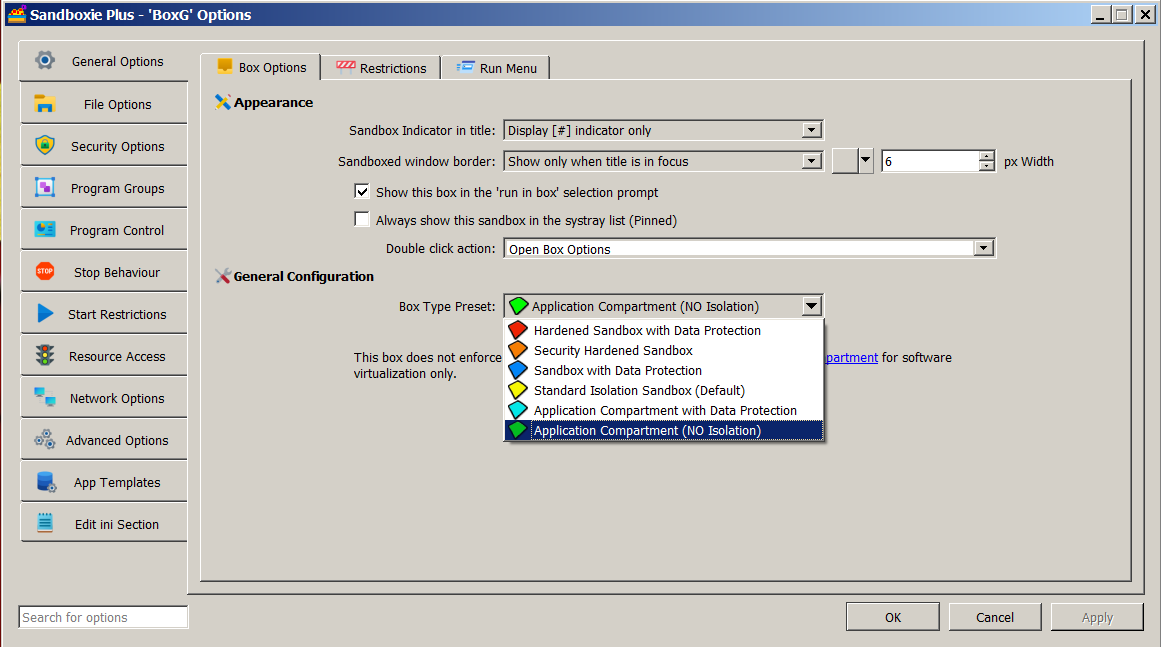
In SandMan, select the Application Compartment box type under Sandbox Options > General Options. The New Box Wizard calls the corresponding preset Application Compartment Box. The status column normally identifies the resulting box as Application Compartment.
If the configuration also opens an entire resource root, for example with OpenFilePath=*, SandMan displays OPEN Root Access instead. This status warning takes display precedence over Application Compartment; it does not change the configured box type or disable NoSecurityIsolation.
The underlying advanced control is under Sandbox Options > Security Options > Security Isolation and is labeled Disable Security Isolation.
Security and compatibility model
Application Compartment bypasses Sandboxie's normal restricted-primary-token replacement and normal impersonation-token filtering paths. It also excludes processes from Sandboxie's normal root Job Object assignment and relaxes several security-oriented path-policy defaults.
Application Compartment does not itself elevate a process. Instead, it bypasses Sandboxie's normal restricted-token replacement, so the process can retain the security context with which it was launched. An unelevated process remains unelevated, while a process deliberately launched elevated can retain that elevated context.
File-system and registry virtualization can remain active. File, registry-key, and kernel-object driver filtering also remain separate and are not disabled merely by selecting Application Compartment. Configured resource, network, IPC, and GUI rules can continue to apply.
For the detailed behavior and limitations, see No Security Isolation.
AppContainer token behavior
Application Compartment does not install the standard-sandbox CreateAppContainerToken and CreateAppContainerProfile compatibility hooks or suppress AppContainer process-creation attributes through that standard-box branch. DropAppContainerToken defaults to n in this mode. Explicitly enabling it can remove a caller-supplied AppContainer token restriction while Sandboxie's normal restricted-primary-token replacement is bypassed, weakening token isolation without granting elevation.
The historical FakeAppContainerToken setting does not control the current compartment behavior. See AppContainer Token Compatibility for the separate API and child-creation stages.
Optional filtering relaxation
For additional compatibility, an Application Compartment can use:
This setting disables Sandboxie's driver-level file, registry-key, and kernel-object filters while Application Compartment is active. It does not literally disable every Sandboxie hook, service, rule, or virtualization mechanism. See No Security Filtering.
In SandMan, the checkbox Disable Security Filtering (not recommended) appears on the same Security Isolation page and is enabled only when Disable Security Isolation is selected.
Path and namespace handling
Sandboxie loads built-in TemplateAppCPaths rules for Application Compartment processes. Since Sandboxie Plus 1.8.0, the built-in path rules for this mode are maintained in that dedicated template. These rules provide box-type-specific path policy; they do not disable all resource isolation.
Normal NT directory-object namespace isolation remains a separate setting. Advanced Application Compartment configurations can instead use UseAlternateIpcNaming=y, which gives Sandboxie-redirected named kernel objects a sandbox-specific name suffix rather than using the normal separate directory-object namespace. This does not rename every IPC mechanism. See NT Namespace Isolation.
Job Object limits
Application Compartment processes are not assigned to Sandboxie's normal root Job Object. Box-level process, memory, and CPU limits implemented through that Job Object therefore do not apply in the usual way. See Job Objects.
Version history
- Sandboxie Plus 1.0.0 / Classic 5.55.0: introduced Application Compartment through
NoSecurityIsolation=y, together with the optionalNoSecurityFilteringcompatibility setting. - Sandboxie Plus 1.8.0: moved the built-in Application Compartment access rules into
TemplateAppCPaths. - Sandboxie Plus 1.17.0 / Classic 5.72.0: added
UseAlternateIpcNamingfor alternate named-object handling in Application Compartment boxes.