Ram Disk Letter
RamDiskLetter is a global creation-time setting in Sandboxie Ini (introduced in v1.11.1 / 5.66.1) that optionally assigns a visible drive letter to the shared RAM-disk backend used by sandboxes with UseRamDisk enabled. It is not a separate drive-letter assignment for each box.
Usage
To set the RamDiskLetter, add the following line to the Sandboxie configuration file under the [GlobalSettings] section:
SandMan GUI
The RAM disk letter setting can be selected through:
- Open the
Global Settingswindow in the SandMan interface. - Navigate to
Add-Ons Manager>Add-On Configurationtab. -
Enable the
Assign drive letter to Ram Disksetting and select a drive letter for the RAM disk.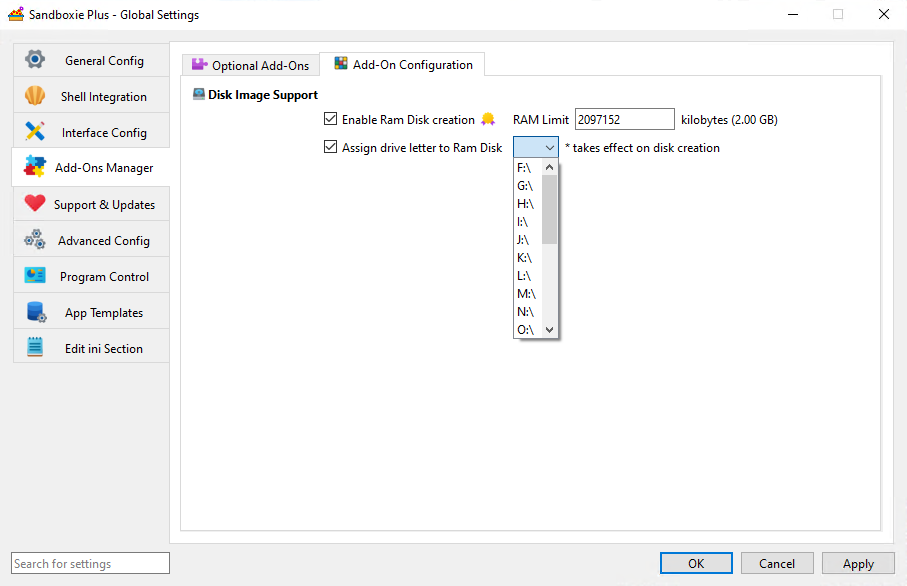
SandMan reads and writes the direct global value; effective configuration may also include applicable templates. It writes the canonical form shown above, such as R:\.
Important Notes
-
Shared Drive Letter: The configured letter refers to the shared RAM volume, not to an individual sandbox. A visible letter does not add an isolation or access-control boundary.
-
Optional Mapping: Without an effective configured letter, the normal creation path still obtains a temporary free letter for creation/formatting and then attempts to remove that mapping. The sandbox can use its root junction without retaining a visible drive letter. A temporary free letter must still be available.
-
Available Drive Letters: Use an unoccupied letter in the canonical
R:\form. If an explicitly configured letter is invalid or already occupied during creation, that path does not automatically choose another letter and cannot proceed with the requested mount.
Applying changes
Configure the desired letter before the shared RAM backend is newly created. Changing or clearing this setting, or reloading configuration, does not change the letter of an existing backend. A new value is used only when a later acquisition creates a new backend, not merely because a box is reopened. Preserve wanted volatile content before destroying the shared backend.
Ease of access
Assigning a specific drive letter can make the RAM volume easier to browse and reference in file paths. It remains optional for normal sandbox operation.
Related Settings
- RamDiskSizeKb - Specifies the requested capacity of the shared RAM disk.
- UseRamDisk - Enables the use of a RAM disk for individual sandboxes.