Bind Adapter
BindAdapter and BindAdapterIP select the local network interface used by supported socket operations in sandboxed processes. The binding is implemented in SbieDll by intercepting Winsock operations; it is not a firewall or a universal network-enforcement boundary.
For matching processes, Sandboxie can bind supported IPv4 and IPv6 socket paths to an address associated with a named adapter or to a configured local IP address. Standard intercepted paths include connection, datagram send/receive, and related Winsock extension paths, but software that bypasses those paths is outside this feature's scope.
Choosing a binding method
Use BindAdapter when the address may change, as with DHCP or a VPN. Sandboxie matches the configured value to a Windows adapter FriendlyName, without regard to letter case, and follows the usable addresses currently assigned to that adapter.
Use BindAdapterIP when a specific local address must be selected. The address must remain assigned to an active host interface; Sandboxie does not migrate the rule to another address if the host configuration changes.
If both settings are applicable to the same process, BindAdapter has configuration precedence. BindAdapterIP is used when adapter-based binding is not the applicable configured mechanism; it is not a fallback for an unavailable named adapter.
BindAdapter syntax
Omit process to apply the rule to every process in the sandbox, or specify an executable name for a program-specific rule. Adapter friendly names that contain spaces can be written directly.
Examples:
The first rule applies to all processes that do not have a more specific applicable rule. The second applies to browser.exe and selects the adapter named My VPN.
Rules are read from the sandbox's effective configuration, including inherited template settings. The current Sandboxie Plus interface manages box-wide rules; executable-specific rules require manual Sandboxie Ini configuration.
Adapter selection and address families
The named adapter must be present and operational. Sandboxie uses at most one usable IPv4 address and one usable IPv6 address from it. During adapter selection it excludes IPv4 link-local addresses in 169.254.0.0/16 and IPv6 link-local addresses in fe80::/10.
An adapter may therefore provide:
- only IPv4;
- only IPv6; or
- both address families.
The available family must match the socket operation. StrictBindIP controls whether an unconfigured or currently unavailable family may continue without the requested binding.
Sandboxie periodically refreshes the state and addresses of a selected named adapter. This allows an adapter missing when the process initialized to be detected if it later appears, and allows address changes such as DHCP renewal or VPN reconnection to be followed. It does not use localhost as a fallback when the adapter is unavailable.
StrictBindIP
StrictBindIP was added in Sandboxie Plus 1.16.7 and is enabled by default. It is relevant only when BindAdapter or BindAdapterIP has initialized the binding subsystem.
Examples:
With the default y value, supported intercepted Winsock operations normally fail when the selected binding is unavailable or when the operation uses an address family for which no binding is configured. A common observable error is WSAEADDRNOTAVAIL, although applications should not rely on one error value for every socket path.
With StrictBindIP=n, a normal intercepted path that cannot use the configured address may continue unbound, allowing Windows to choose another local address and route. This may send traffic through a different interface, so the compatibility fallback should be enabled only when that behavior is acceptable.
Connection and datagram paths such as connect, WSAConnect, ConnectEx, sendto, WSASendTo, recvfrom, and WSARecvFrom are among the operations handled by the binding code. Explicit application calls to bind and other socket paths are not all handled identically. Treat StrictBindIP as compatibility behavior within the user-mode interception layer, not as an absolute network policy.
Sandboxie Plus does not currently provide a dedicated StrictBindIP checkbox. Configure it in Sandboxie.ini when a non-default value is required.
Security and privacy limitations
Adapter binding controls the local source address used by supported intercepted Winsock operations. It does not:
- create Windows Filtering Platform (WFP) rules;
- block every possible networking mechanism;
- cover code that bypasses the intercepted Winsock paths, including kernel-mode networking; or
- guarantee that traffic can never use another interface.
When interface confinement is security-sensitive, combine binding with an independently enforced network policy. See Windows Filtering Platform for Sandboxie's separate filtering support.
Interaction with SOCKS proxying
On the normal proxy path, source-address or adapter binding is evaluated before Sandboxie makes the SOCKS proxy connection. An unavailable strict binding can therefore prevent connection to the proxy endpoint.
The experimental UseProxyThreads compatibility mode creates the external proxy connection from a separate relay worker and should not be treated as providing the same source-address binding guarantees as the normal path. See Proxy Support for the proxy feature's scope and limitations.
Applying configuration changes
BindAdapter and BindAdapterIP rules are initialized when a sandboxed process initializes Winsock. Restart affected sandboxed processes after changing those rules.
The physical state and current addresses of an already selected BindAdapter are refreshed while the process runs. By contrast, BindAdapterIP revalidates whether its configured literal address remains assigned to an operational interface but does not rewrite the rule to use another address. StrictBindIP is queried during intercepted operations, so a saved change may affect subsequent operations in a process whose binding subsystem is already initialized. Restarting affected processes after changing network configuration remains the reliable practice. A SandMan or Sandboxie service restart is not normally required.
Sandboxie Plus interface
In Sandboxie Plus, open:
Sandbox Options > Network Options > Other Options
The group is labeled Bind to Adapter IP and contains:
- an adapter drop-down list;
- an IPv4: field; and
- an IPv6: field.
Selecting an adapter configures BindAdapter. Selecting None (Don't bind to adapter) allows literal addresses to be entered for BindAdapterIP. The single UI group therefore represents two distinct configuration keys.
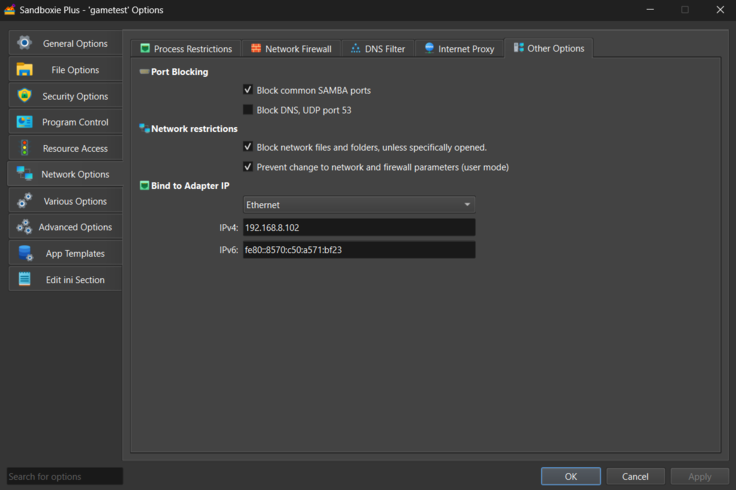
SandMan provides this current configuration interface. The runtime is shared by Sandboxie Plus and Classic, so Classic can consume compatible manually configured settings where the feature is available, but it does not provide the equivalent modern interface. StrictBindIP is an INI setting rather than a dedicated SandMan or Classic checkbox.
Version history
- Sandboxie Plus 1.15.10 / Classic 5.70.10 introduced BindAdapterIP, including executable-qualified configuration.
- Sandboxie Plus 1.15.12 / Classic 5.70.12 introduced BindAdapter for selecting a named adapter.
- The 1.16.x series added fixes for adapter and VPN disconnection handling.
- Sandboxie Plus 1.16.7 / Classic 5.71.7 added StrictBindIP.
Related settings
- Bind Adapter IP — details for binding to a literal local address
- Proxy Support — SOCKS5 proxy behavior and binding interaction
- Windows Filtering Platform — separate network-layer enforcement
- Network DNS Filter — filters DNS requests from sandboxed programs